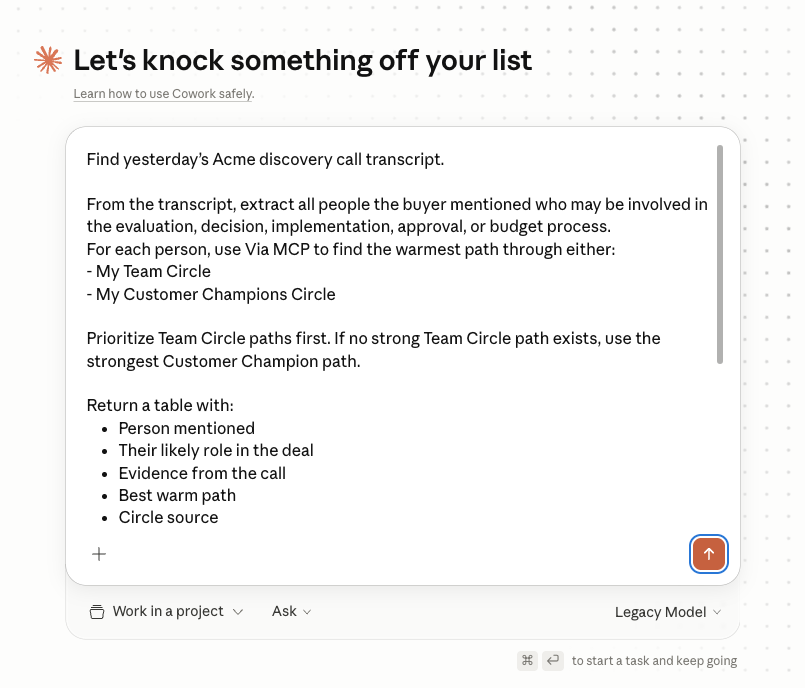
Scenario: after a call, your buyer mentions that the CISO and CEO will both weigh in. That is useful context, but only if you act on it quickly.
Using Claude + Via, you can pull those stakeholders from the transcript, find warm paths through your team and customer champions, and draft the exact Slack and email messages needed to activate those paths. You review every draft and send the ones you like.
In seconds, you learn your VP Sales worked with the CISO at Stripe, and one of your customers was a YC batchmate of the CEO.
Instead of sending a generic follow-up and hoping your champion forwards it, you now have two warm plays to expand the deal.
Granola
Gmail
An illustrative run. Claude drafts every message for you to review, and nothing is sent on your behalf.
run_network_query · People + Access
Result 7 stakeholders · 2 with warm paths
| Stakeholder | Role in deal | Best warm path | Source | Next action |
|---|---|---|---|---|
| Priya Shah CISO, Acme |
Security gate; must sign off | Sarah Kim Worked at Stripe together |
Team Network | Review Slack draft |
| Marcus Lee CEO, Acme |
Exec sponsor for the tier | Daniel Sun YC W21 batchmate |
Customer Champion | Review email draft |
Install the connectors, open Cowork, paste the prompt, review the drafts. A runbook, not an article.
Start a 7-day free trial, then add Via in Claude as a custom connector at https://mcp.connectvia.ai/mcp and sign in (the setup guide walks through it), then connect the other three tools this workflow uses.
Multi-tool workflows like this run more reliably in Claude Cowork than in regular chat. It handles the sequential tool calls without losing context and keeps each step visible. Drafts save to Slack or email where those connectors support it, or stay in the chat for you to copy.
Replace Acme with the prospect company. The prompt tells Claude to prioritize Team Network paths first, fall back to Customer Champion paths, and draft only. Nothing gets sent automatically. Uncertain matches go into a "Needs Review" section at the bottom for your eyes.
Heads up: this prompt assumes you've set up a Team Network and a Customer Champions Network in Via. You can do that directly from Claude, just ask Via MCP something like: "Create a Customer Champions Network with the following LinkedIn URLs: [paste URLs]." Same pattern for the Team Network.
Claude returns every stakeholder the buyer named, the warm path to each, and a draft for each: a Slack to a teammate for Team Network paths, a short vouch-note request email to your champion for Customer Champion paths. Always keep a human in the loop on personalized outreach. The prompt is set up to draft only. Nothing leaves your inbox or Slack until you press send. Two things to do for every draft:
Get the warm intros queued before your buyer's other priorities knock you out of cycle.